Durable AI Agent Workflows on Azure Functions
The Microsoft Agent Framework is an open-source, multi-language framework for building, orchestrating, and deploying AI agents. It provides a workflow programming model for composing AI agents and other units of work into multi-step pipelines. To make these workflows stateful, long-running, and fault-tolerant, the Azure Functions hosting package (Microsoft.Agents.AI.Hosting.AzureFunctions) can be used, which builds on the core Durable Task extension (Microsoft.Agents.AI.DurableTask) to host workflows on Azure Functions with automatic durability.
This post walks through building durable workflows and hosting them on Azure Functions. Starting with a minimal workflow, it progressively adds parallel execution, human-in-the-loop approvals, and MCP tool integration.
Why Durable Workflows?
AI agents are powerful on their own, but real-world scenarios often require orchestrating multiple agents together with branching logic, parallel processing, human approval gates, and the ability to survive failures and restarts. That’s where durable workflows come in.
Durable workflows are powered by the Durable Task technology stack, which provides:
- Stateful, durable execution - workflows survive process restarts and failures
- Automatic checkpointing - progress is saved after each step
- Long-running orchestrations - workflows can run for minutes, hours, or even days
- Observability - built-in tools for monitoring and managing workflow executions
The Workflow Programming Model
Before hosting anything, here are the core building blocks of a MAF workflow.
Executors
An Executor is the fundamental unit of work. It receives a typed message, processes it, and optionally produces output. Think of it as a single step in your pipeline.
using Microsoft.Agents.AI.Workflows;

internal sealed class OrderLookup() : Executor<string, Order>("OrderLookup")
{
    public override async ValueTask<Order> HandleAsync(
        string message, IWorkflowContext context, CancellationToken cancellationToken = default)
    {
        // Simulate looking up an order by ID
        return new Order(
            Id: message,
            OrderDate: DateTime.UtcNow.AddDays(-1),
            IsCancelled: false,
            Customer: new Customer(Name: "Jerry", Email: "jerry@example.com"));
    }
}

internal sealed class OrderCancel() : Executor<Order, Order>("OrderCancel")
{
    public override async ValueTask<Order> HandleAsync(
        Order message, IWorkflowContext context, CancellationToken cancellationToken = default)
    {
        // Cancel the order
        return message with { IsCancelled = true };
    }
}

internal sealed class SendEmail() : Executor<Order, string>("SendEmail")
{
    public override ValueTask<string> HandleAsync(
        Order message, IWorkflowContext context, CancellationToken cancellationToken = default)
    {
        return ValueTask.FromResult(
            $"Cancellation email sent for order {message.Id} to {message.Customer.Email}.");
    }
}

internal sealed record Order(string Id, DateTime OrderDate, bool IsCancelled, Customer Customer);
internal sealed record Customer(string Name, string Email);
WorkflowBuilder
The WorkflowBuilder wires executors into a directed graph. You define edges between executors to control the flow of data and the builder produces an immutable Workflow object.
OrderLookup orderLookup = new();
OrderCancel orderCancel = new();
SendEmail sendEmail = new();

// Build the CancelOrder workflow: OrderLookup -> OrderCancel -> SendEmail
Workflow cancelOrder = new WorkflowBuilder(orderLookup)
    .WithName("CancelOrder")
    .WithDescription("Cancel an order and notify the customer")
    .AddEdge(orderLookup, orderCancel)
    .AddEdge(orderCancel, sendEmail)
    .Build();
This runs entirely in memory using InProcessExecution.RunAsync:
string result = await InProcessExecution.RunAsync(cancelOrder, "12345");
But if the process crashes, the workflow state is lost. The hosting package solves that.
Hosting Workflows on Azure Functions
The Microsoft.Agents.AI.Hosting.AzureFunctions package bridges MAF workflows with the Azure Functions runtime. You define your workflow the same way, then register it with a single call to ConfigureDurableWorkflows. The framework auto-generates all the necessary durable function triggers, orchestrator functions, and HTTP endpoints.
Why Azure Functions?
Hosting workflows on Azure Functions brings several benefits beyond just durability:
- Serverless scaling - Azure Functions automatically scales out based on workload. Workflow executions scale independently without managing infrastructure.
- Pay-per-execution pricing - You only pay for the compute time your executors actually use, making it cost-effective for bursty or low-traffic workflows.
- Built-in HTTP endpoints - Each registered workflow gets an HTTP trigger automatically. No need to write controllers or routing logic.
- Durable Task Scheduler integration - Workflow state is persisted and managed by the Durable Task Scheduler, providing reliability, observability, and cross-process coordination out of the box.
- Zero boilerplate - The hosting package generates orchestrator functions, activity functions, and entity functions from the workflow definition. The only code to write is the executors and the workflow graph.
- MCP tool support - Workflows can be exposed as MCP tools with a single flag, making them discoverable by AI agents and other MCP-compatible clients.
Install the package:
dotnet add package Microsoft.Agents.AI.Hosting.AzureFunctions
📂 View the full sample on GitHub
Here’s a complete Program.cs for a Functions app that hosts the CancelOrder workflow:
using Microsoft.Agents.AI.Hosting.AzureFunctions;
using Microsoft.Agents.AI.Workflows;
using Microsoft.Azure.Functions.Worker.Builder;
using Microsoft.Extensions.Hosting;

// Define executors
OrderLookup orderLookup = new();
OrderCancel orderCancel = new();
SendEmail sendEmail = new();

// Build the CancelOrder workflow: OrderLookup -> OrderCancel -> SendEmail
Workflow cancelOrder = new WorkflowBuilder(orderLookup)
    .WithName("CancelOrder")
    .WithDescription("Cancel an order and notify the customer")
    .AddEdge(orderLookup, orderCancel)
    .AddEdge(orderCancel, sendEmail)
    .Build();

// Host it on Azure Functions
using IHost app = FunctionsApplication
    .CreateBuilder(args)
    .ConfigureFunctionsWebApplication()
    .ConfigureDurableWorkflows(workflows => workflows.AddWorkflow(cancelOrder))
    .Build();

app.Run();
The key addition here is .ConfigureDurableWorkflows() — an extension method provided by the Microsoft.Agents.AI.Hosting.AzureFunctions package. It’s the single call that bridges your MAF workflow definition to the Azure Functions runtime. Everything else in Program.cs is standard Azure Functions boilerplate.
Behind the scenes, the hosting layer automatically maps your workflow concepts to Durable Functions primitives:
- Your workflow becomes an orchestrator function — the workflow graph is translated into a durable orchestration that coordinates the execution of each step
- Each executor becomes an activity function — executors are wrapped as durable activity functions, giving them automatic retry, checkpointing, and fault tolerance
- An HTTP trigger is generated to start the workflow:
POST /api/workflows/CancelOrder/run - Integration with the Durable Task Scheduler provides durability and scale
Because these are standard Azure Functions under the hood, you automatically get all the platform benefits — auto-scaling, built-in monitoring via Application Insights, distributed tracing, and the full Azure Functions observability and diagnostics tooling — without writing any extra infrastructure code.
When you run func start, you can see these auto-generated functions in the terminal output. Notice the dafx- prefixed functions — these are the durable activity and orchestration triggers that the hosting package generated from your workflow definition:
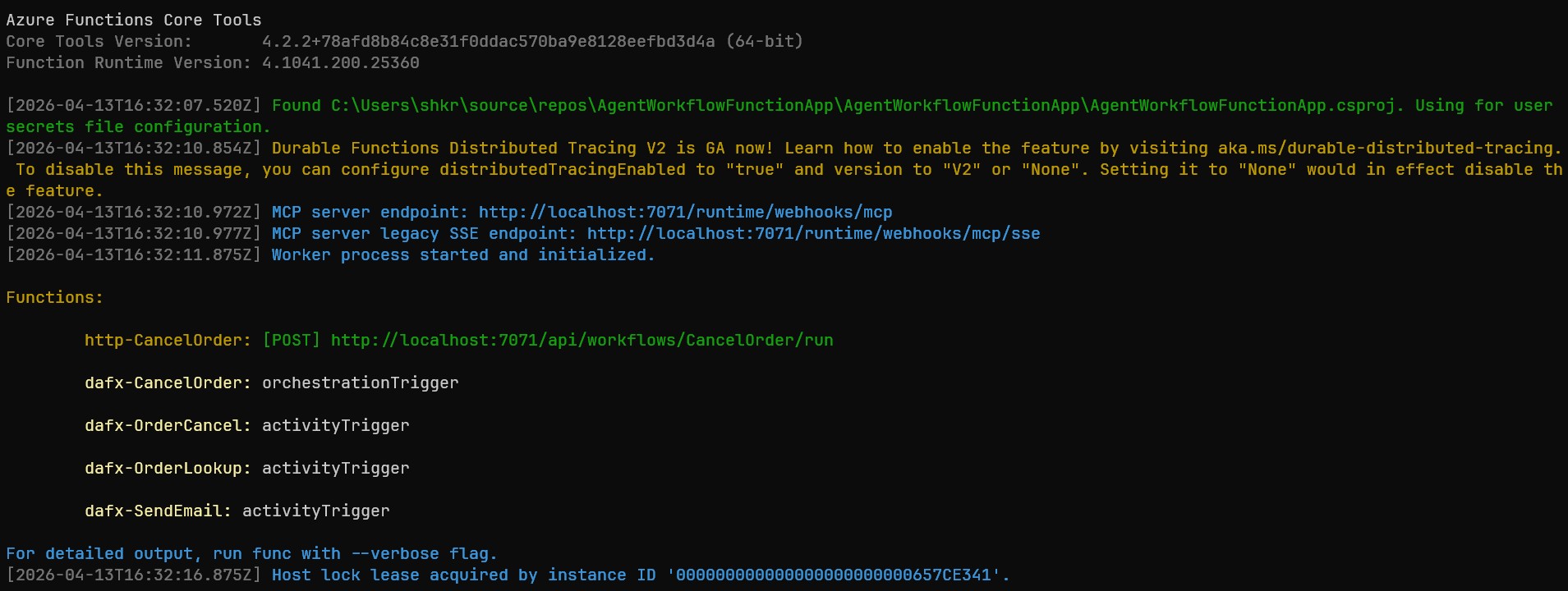
The http-CancelOrder function is the HTTP endpoint you’ll call to start the workflow, while the dafx-* functions are the internal plumbing: dafx-CancelOrder is the orchestrator, and dafx-OrderLookup, dafx-OrderCancel, and dafx-SendEmail are the activity triggers — one for each executor in the workflow graph.
Invoking the Workflow
Once the Functions app is running, you can trigger the workflow with a simple HTTP request:
POST http://localhost:7071/api/workflows/CancelOrder/run
Content-Type: text/plain

12345
This starts the orchestration asynchronously and returns a 202 Accepted response with a run ID. The workflow then executes durably in the background, looking up order 12345, cancelling it, and sending a confirmation email.
Complex JSON inputs are also supported:
POST http://localhost:7071/api/workflows/BatchCancelOrders/run
Content-Type: application/json

{"orderIds": ["1001", "1002", "1003"], "reason": "Customer requested", "notifyCustomers": true}
You can register multiple workflows in a single Functions app. Executors can even be shared across workflows:
// OrderStatus reuses the same OrderLookup executor as CancelOrder
Workflow orderStatus = new WorkflowBuilder(orderLookup)
    .WithName("OrderStatus")
    .WithDescription("Look up an order and generate a status report")
    .AddEdge(orderLookup, statusReport)
    .Build();

.ConfigureDurableWorkflows(workflows =>
    workflows.AddWorkflows(cancelOrder, orderStatus, batchCancelOrders))
Fan-Out / Fan-In (Parallel Execution)
When you need multiple agents to process the same input concurrently, use the fan-out / fan-in pattern. AddFanOutEdge sends a message to multiple executors in parallel, and AddFanInBarrierEdge waits for all of them to complete before proceeding.
📂 View the full sample on GitHub
Here’s a workflow where a physics agent and a chemistry agent both answer the same question, and an aggregator combines their responses:
// Create AI agents as executors
AIAgent physicist = chatClient.AsAIAgent(
    "You are a physics expert. Be concise (2-3 sentences).", "Physicist");
AIAgent chemist = chatClient.AsAIAgent(
    "You are a chemistry expert. Be concise (2-3 sentences).", "Chemist");

ParseQuestionExecutor parseQuestion = new();
AggregatorExecutor aggregator = new();

// Build workflow: ParseQuestion -> [Physicist, Chemist] (parallel) -> Aggregator
Workflow workflow = new WorkflowBuilder(parseQuestion)
    .WithName("ExpertReview")
    .AddFanOutEdge(parseQuestion, [physicist, chemist])
    .AddFanInBarrierEdge([physicist, chemist], aggregator)
    .Build();

// Host on Azure Functions
using IHost app = FunctionsApplication
    .CreateBuilder(args)
    .ConfigureFunctionsWebApplication()
    .ConfigureDurableWorkflows(workflows => workflows.AddWorkflow(workflow))
    .Build();

app.Run();
Notice how AIAgent instances can be used directly in the workflow graph, just like any other executor. The AsAIAgent extension method creates an agent from a chat client and system prompt.
Human-in-the-Loop
One of the most powerful patterns is human-in-the-loop, which pauses a workflow to wait for external approval or input before continuing. This is modeled using RequestPort.
A RequestPort acts like an executor in the graph, but instead of processing data automatically, it pauses the workflow and waits for an external response. When hosted on Azure Functions, the framework auto-generates HTTP endpoints for checking pending requests and submitting responses.
📂 View the full sample on GitHub
Here’s an expense reimbursement workflow with three approval gates (one manager approval, then two parallel finance approvals):
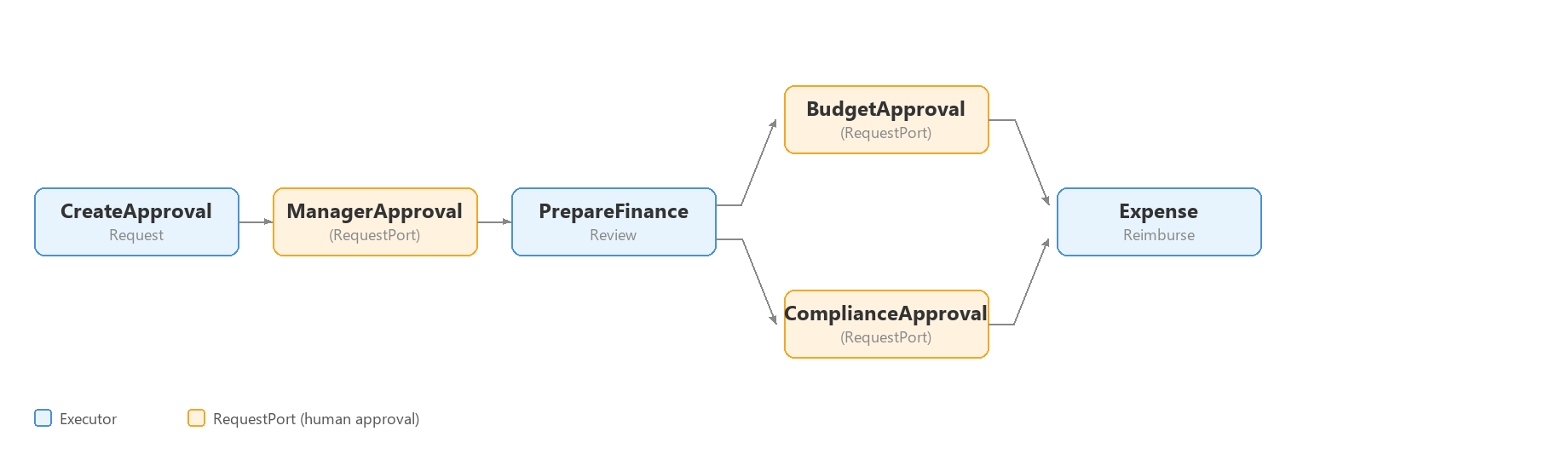
// Define executors and RequestPorts for the HITL pause points
CreateApprovalRequest createRequest = new();
RequestPort<ApprovalRequest, ApprovalResponse> managerApproval =
    RequestPort.Create<ApprovalRequest, ApprovalResponse>("ManagerApproval");
PrepareFinanceReview prepareFinanceReview = new();
RequestPort<ApprovalRequest, ApprovalResponse> budgetApproval =
    RequestPort.Create<ApprovalRequest, ApprovalResponse>("BudgetApproval");
RequestPort<ApprovalRequest, ApprovalResponse> complianceApproval =
    RequestPort.Create<ApprovalRequest, ApprovalResponse>("ComplianceApproval");
ExpenseReimburse reimburse = new();

// Build the workflow with sequential and parallel approval gates
Workflow expenseApproval = new WorkflowBuilder(createRequest)
    .WithName("ExpenseReimbursement")
    .WithDescription("Expense reimbursement with manager and parallel finance approvals")
    .AddEdge(createRequest, managerApproval)
    .AddEdge(managerApproval, prepareFinanceReview)
    .AddFanOutEdge(prepareFinanceReview, [budgetApproval, complianceApproval])
    .AddFanInBarrierEdge([budgetApproval, complianceApproval], reimburse)
    .Build();

// Host on Azure Functions with status endpoint enabled
using IHost app = FunctionsApplication
    .CreateBuilder(args)
    .ConfigureFunctionsWebApplication()
    .ConfigureDurableWorkflows(workflows =>
        workflows.AddWorkflow(expenseApproval, exposeStatusEndpoint: true))
    .Build();

app.Run();
With exposeStatusEndpoint: true, the framework generates three HTTP endpoints for this workflow:
POST /api/workflows/ExpenseReimbursement/run- Start the workflowGET /api/workflows/ExpenseReimbursement/status/{runId}- Check status and see pending approvalsPOST /api/workflows/ExpenseReimbursement/respond/{runId}- Submit an approval response to resume
External systems (or humans via a UI) can poll the status endpoint to see which approvals are pending, then POST a response to unblock the workflow. The respond endpoint expects a JSON body with the eventName (matching the RequestPort name) and the response data:
POST http://localhost:7071/api/workflows/ExpenseReimbursement/respond/{runId}
Content-Type: application/json

{"eventName": "ManagerApproval", "response": {"approved": true, "comments": "Looks good"}}
Exposing Workflows as MCP Tools
With the exposeMcpToolTrigger: true option, your workflows become callable as MCP (Model Context Protocol) tools. Other AI agents or MCP-compatible clients can discover and invoke your workflows as tools.
📂 View the full sample on GitHub
// Define workflow
Workflow orderLookupWorkflow = new WorkflowBuilder(lookupOrder)
    .WithName("OrderLookup")
    .WithDescription("Look up an order by ID and return enriched order details")
    .AddEdge(lookupOrder, enrichOrder)
    .Build();

// Expose as MCP tool
using IHost app = FunctionsApplication
    .CreateBuilder(args)
    .ConfigureFunctionsWebApplication()
    .ConfigureDurableWorkflows(workflows =>
    {
        workflows.AddWorkflow(orderLookupWorkflow,
            exposeStatusEndpoint: false, exposeMcpToolTrigger: true);
    })
    .Build();

app.Run();
The Functions host generates a remote MCP endpoint at /runtime/webhooks/mcp with a tool for each registered workflow. The workflow’s .WithName() and .WithDescription() are used as the MCP tool name and description.
Agents and Workflows Together
When you need to register both standalone AI agents and workflows in a single Functions app, use ConfigureDurableOptions — the more general sibling of ConfigureDurableWorkflows that gives you access to both options.Agents and options.Workflows:
📂 View the full sample on GitHub
// Define a standalone AI agent
AIAgent assistant = chatClient.AsAIAgent(
    "You are a helpful assistant. Answer questions clearly and concisely.",
    "Assistant",
    description: "A general-purpose helpful assistant.");

// Define a workflow
Workflow translateWorkflow = new WorkflowBuilder(translateText)
    .WithName("Translate")
    .WithDescription("Translate text to uppercase and format the result")
    .AddEdge(translateText, formatOutput)
    .Build();

// Register both with Azure Functions
using IHost app = FunctionsApplication
    .CreateBuilder(args)
    .ConfigureFunctionsWebApplication()
    .ConfigureDurableOptions(options =>
    {
        options.Agents.AddAIAgent(assistant,
            enableHttpTrigger: true, enableMcpToolTrigger: true);
        options.Workflows.AddWorkflow(translateWorkflow,
            exposeStatusEndpoint: false, exposeMcpToolTrigger: true);
    })
    .Build();

app.Run();
More Workflow Patterns
The workflow programming model supports several additional patterns that work with both in-process and durable execution:
Conditional Routing
Use AddSwitch to route messages to different executors based on the output of a previous step:
builder.AddSwitch(spamDetectionExecutor, switchBuilder =>
    switchBuilder
        .AddCase(
            result => result is DetectionResult r && r.spamDecision == SpamDecision.NotSpam,
            emailAssistantExecutor)
        .AddCase(
            result => result is DetectionResult r && r.spamDecision == SpamDecision.Spam,
            handleSpamExecutor)
        .WithDefault(handleUncertainExecutor));
Shared State
Executors can share data through scoped key-value state, useful when parallel executors need access to the same source data:
// Write to shared state in one executor
await context.QueueStateUpdateAsync(
    fileID, fileContent, scopeName: "FileContentState", cancellationToken);

// Read from shared state in another executor
var fileContent = await context.ReadStateAsync<string>(
    message, scopeName: "FileContentState", cancellationToken);
Sub-Workflows
Embed a workflow as an executor inside another workflow for modular, hierarchical architectures:
// Build a sub-workflow
var subWorkflow = new WorkflowBuilder(uppercase)
    .AddEdge(uppercase, reverse)
    .AddEdge(reverse, append)
    .WithOutputFrom(append)
    .Build();

// Use it as an executor in a parent workflow
ExecutorBinding subWorkflowExecutor = subWorkflow.BindAsExecutor("TextProcessing");

var mainWorkflow = new WorkflowBuilder(prefix)
    .AddEdge(prefix, subWorkflowExecutor)
    .AddEdge(subWorkflowExecutor, postProcess)
    .WithOutputFrom(postProcess)
    .Build();
When running on the durable runtime, sub-workflows execute as sub-orchestrations with proper result propagation.
Wrapping Up
Durable workflows in the Microsoft Agent Framework bring together the flexibility of AI agents and the reliability of durable orchestrations. With a few lines of code, you can build complex multi-step workflows and host them on Azure Functions with auto-generated HTTP endpoints, human-in-the-loop support, and MCP tool integration.
Here are some useful links to get started:
- Microsoft Agent Framework on GitHub
- Workflow samples
- Azure Functions hosting samples
- Standalone sample repo for this blog post
- Microsoft.Agents.AI.Hosting.AzureFunctions NuGet package
- Microsoft.Agents.AI.DurableTask NuGet package
Give it a try and share your feedback or questions on the GitHub repo. Issues and contributions are welcome!
Cheers